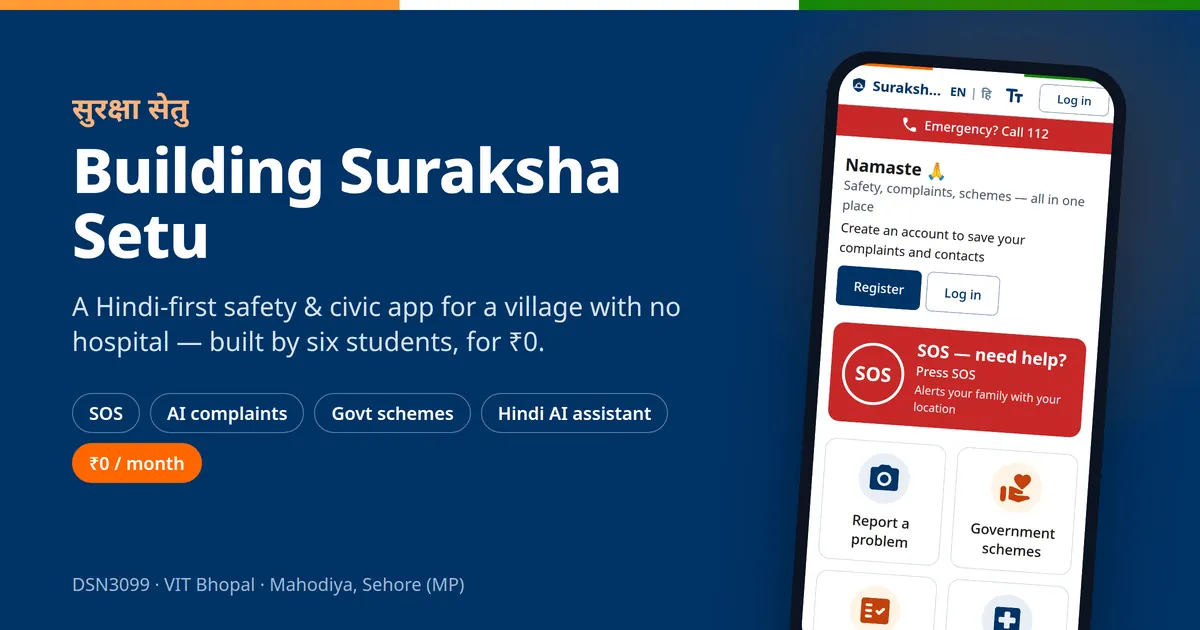
Building Suraksha Setu: A Safety App for a Village With No Hospital — for ₹0
Most of the apps I use were built for people like me: fast phone, good English, unlimited data, a city around them.
Suraksha Setu started with a simple question from our DSN3099 (Engineering Projects in Community Service) course at VIT Bhopal: what would an app look like if it was built for someone who has none of that?
We are six — Srishti Bansal, Anshika Mishra, Damini Gupta, Shrishti Srivastava, Deep Chakraborty and me — and this is the story of the project so far.
The village
Our pilot village is Mahodiya, in Sehore district of Madhya Pradesh, about 50 km from Bhopal. You may have seen it without knowing — it's where the web series Panchayat is filmed.
Off-screen, the numbers are less charming:
- About 1,919 people in 375 households
- No hospital, no PHC, no secondary school, no bus service
- No tap water — handpumps and borewells only
- Roads that break after every monsoon
- Female literacy somewhere around 52–62%, and phones that are often shared by the whole family
When something goes wrong here, the problem usually isn't that help doesn't exist. It's that people don't know who to call, how to prove what happened, or which scheme they're eligible for — and they often pay a middleman to write a simple application to the Panchayat.
"Suraksha Setu" means safety bridge. That's the whole idea: not replacing the government or 112, just bridging the gap between people and the help that already exists.
What we built
One web app, Hindi first (English one tap away), with big buttons, icons on everything, and three text sizes (A− / A / A+). Seven modules:
| Module | What it does |
|---|---|
| 🆘 Women's SOS | One big button → 5-second countdown → your live location goes to your emergency contacts by SMS (from your own phone), email, and a live tracking link |
| 📸 AI civic complaints | Photograph a broken handpump or pothole → a CNN suggests the category → the complaint gets a number, a department and a visible timeline |
| 📜 Government schemes | Laadli Behna, PM-KISAN, Ayushman Bharat and more, in simple Hindi, with an 8-question eligibility checker and a document checklist |
| 🩸 Blood donors | Find compatible donors nearby — phone numbers stay masked until you really need them |
| 🚑 Emergency services | 112, 108, 1091, 1098 and nearby hospitals/police — the numbers work even offline |
| 🏛️ Authority portal | A dashboard for the Panchayat: complaints, live SOS map, analytics, audit log |
| 🪔 Sahayak | A Hindi AI assistant that explains schemes from our verified data only and drafts formal letters you can print or send on WhatsApp |
The part I'm proudest of is small: if anyone types "bachao" or "मदद करो" into Sahayak, the app shows the SOS card and a Call 112 button before the AI even sees the message. Safety should never wait for a language model.
The stack (and why)
- React + Vite + Material UI, styled like Indian government sites (UIDAI, DigiLocker) — calm, trustworthy, not a flashy startup look
- Node.js + Express + MongoDB Atlas for the main API, with Socket.IO so an SOS reaches the portal in under 5 seconds
- A separate Python/Django AI service — the complaint-photo CNN (MobileNetV2, run with LiteRT so it fits in 512 MB of RAM) and Sahayak live there, so if AI goes down, SOS and complaints keep working
- Google Gemini for Sahayak, grounded on our own scheme catalogue
- A PWA, not a native app — installs to the home screen, works offline for the essentials, one codebase for villagers and officials
A few decisions we'll defend in any viva:
- SOS uses the phone's own SMS app, not an SMS API. Server SMS in India needs DLT registration and costs money per message; the user's own SMS app is free and works even if our server is down.
- No OTP login. Same reason — cost and DLT. Phone + password is enough for a village pilot.
- Every string exists in Hindi and English — the build fails if even one is missing. 1,202 strings in each language.
The rule that shaped everything: ₹0
Before a single line of code, we set one hard rule: the project must cost nothing. No card, no billing account, no "we'll upgrade for the demo."
It sounds like a budget constraint. It turned out to be the best design constraint we had — because every free tier has a sharp edge, and we cut ourselves on most of them:
1. Free hosting sleeps. Render's free plan puts a service to sleep after 15 minutes of no traffic. Our first Sahayak test failed because the AI service was asleep. Our backup "keep-awake" job on GitHub Actions? GitHub ran it 4 times in 20 hours instead of every 10 minutes. The fix: the API now keeps itself awake during the day, the AI service wakes up the moment you open Sahayak, and if it's still waking up, Sahayak waits and tells you "waking up — the first reply can take a minute" instead of failing.
2. Free hosting blocks email. Render's free plan blocks outgoing SMTP ports. Gmail timed out. We moved to an email API (Brevo) — which then suspended our brand-new account and asked for a custom domain we'd have to buy. Final answer: a tiny Google Apps Script relay that sends from Google's own servers. Free, no domain, ~100 emails a day. More than enough for a village.
3. Google Maps needs a credit card. So every map in the app — SOS tracking, complaint pins, the live portal — runs on Leaflet + OpenStreetMap. Free, no key, and actually lighter on a cheap phone (the map code loads only when a map is on screen).
4. The free AI tier gets busy. One Gemini model failed 3 out of 3 times with "high demand". We tested models side by side, switched to the one that answered every time, and added a fallback that respects Google's minimum 10-second deadline (yes, we learned that one from an error message).
Total monthly bill today: ₹0. Vercel, Render, MongoDB Atlas M0, Cloudinary, Gemini — all on free plans.
By the numbers
- 7 modules, 50+ screens designed, 46 routes
- ~45,000 lines of code across web, API, AI service and ML pipeline
- ~44,000 words of planning docs (PRD, technical spec, app flow, UI brief, schema, implementation plan)
- 587 automated tests — including 17 end-to-end tests that run the whole app on a 360 px phone screen in Hindi and fail on any accessibility or security-policy violation
- 96% line coverage on the API
- Lighthouse accessibility 100, first download ~228 KB
The most important lesson wasn't technical
While testing SOS, the screen said "अधिकारी को सूचना दी गई" — "Authority alerted."
Technically true: the alert reached our portal. But the only people on the portal today are us, six students. A frightened villager reading "authority alerted" could reasonably believe the police are coming.
That's the difference between building for a demo and building for people. In a safety app, honest wording is a feature. The screen should say what really happened — "sent to the Suraksha Setu helpdesk, for police call 112" — and only say "seen" when a human has actually acknowledged it.
What's honest to say about where we are
The software is built and live. The real test hasn't happened yet:
- Field visit 1 — meet the Panchayat, confirm who will actually use the portal, interview residents, collect photos (with consent) to train the complaint CNN on real village images
- Verify every scheme from official sources before it's published — fewer, correct schemes beat many unverified ones
- Usability testing with 8–10 villagers (our target: a SUS score of 68+)
- A 4-week pilot with pre-announced SOS drills
We'll report the pilot numbers honestly, even the ones we miss.
What I'm taking away
- Constraints are a gift. "It must be free" forced better engineering than an unlimited budget would have.
- Build for the worst phone, the weakest network and the least-confident user — everyone else benefits automatically.
- Safety features need honesty more than cleverness.
- And a good team makes a year-long project feel possible. This one belongs to all six of us.
If you're curious, the app is live at suraksha-setu-zeta.vercel.app — switch to English from the header if Hindi isn't your language. It's an independent student project, not a government service.
More updates after the field visit. 🙏